Skip to contents

Example 1: World Population by Continent


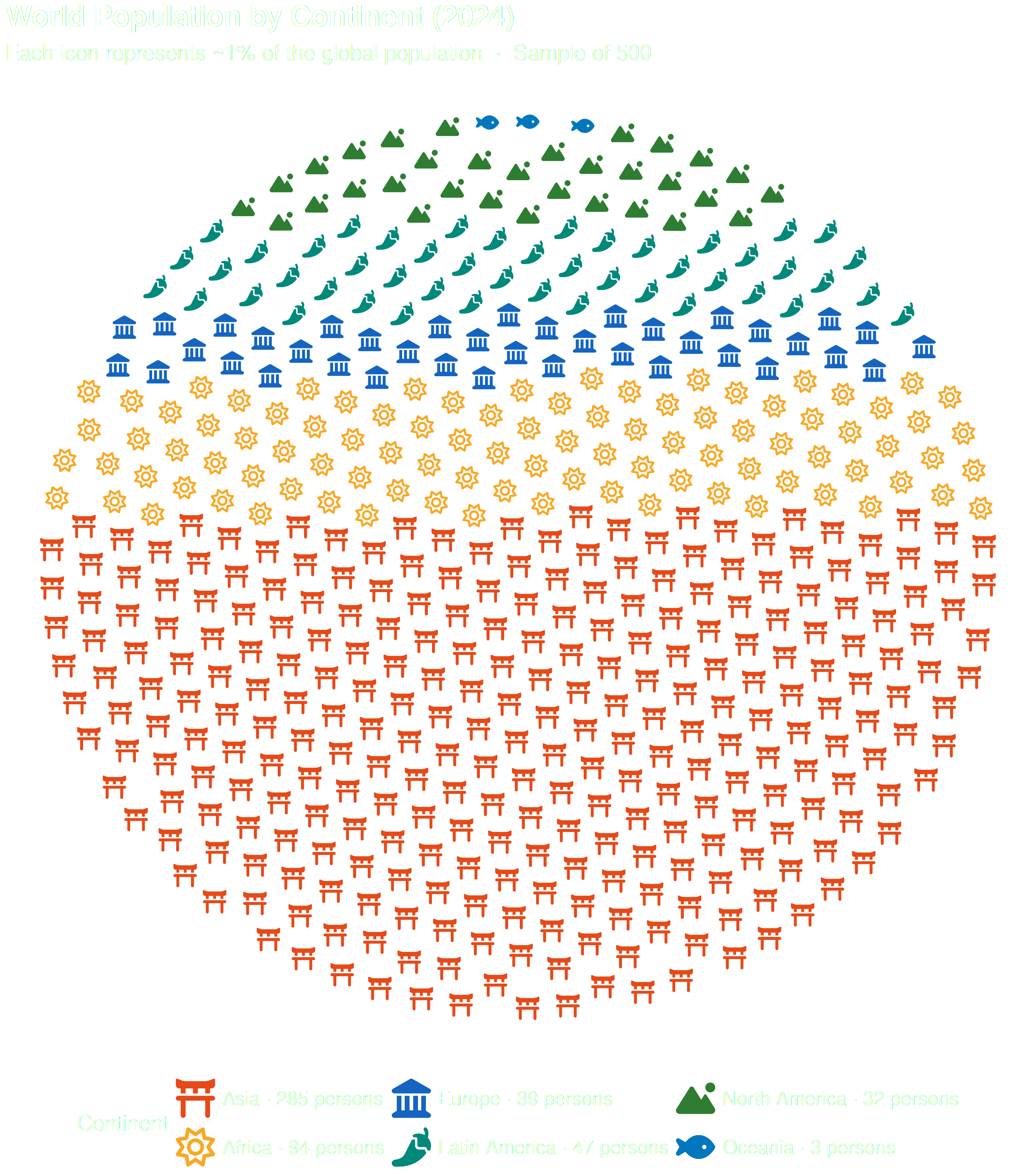
Out of every 100 people on Earth, how many come from each continent?

Show the code
library(ggpop)
library(ggplot2)
library(dplyr)

df_world <- data.frame(
  continent = c("Asia", "Africa", "Europe", "Latin America", "North America", "Oceania"),
  n         = c(4753079000, 1441090000, 748000000, 662000000, 376000000, 45000000)
)

# Search the icons you want to use with fa_icons() and note their names:

fa_icons(query = "torii")
fa_icons(query = "sun")
fa_icons(query = "landmark")


df_world_proc <- process_data(
  data        = df_world,
  group_var   = continent,
  sum_var     = n,
  sample_size = 500
) %>%
  mutate(icon = case_when(
    type == "Asia"          ~ "torii-gate",
    type == "Africa"        ~ "sun",
    type == "Europe"        ~ "landmark",
    type == "Latin America" ~ "pepper-hot",
    type == "North America" ~ "mountain-sun",
    type == "Oceania"       ~ "fish"
  ))

df_world_proc$type <- factor(df_world_proc$type,
  levels = c("Asia", "Africa", "Europe",
             "Latin America", "North America", "Oceania"))

# Build legend labels showing exact icon count per continent
df_counts <- df_world_proc %>%
  group_by(type) %>%
  summarise(n_icons = n(), .groups = "drop") %>%
  mutate(label = paste0(type, " \u00b7 ", n_icons, " persons"))

v_labels <- setNames(df_counts$label, as.character(df_counts$type))

ggplot(data = df_world_proc,
    aes(icon = icon, color = type)) +
  geom_pop(size         = .8,
            dpi          = 100,
            legend_icons = TRUE,
            arrange      = TRUE) +
  scale_color_manual(
    values = c(
      "Asia"          = "#E64A19",
      "Africa"        = "#F9A825",
      "Europe"        = "#1565C0",
      "Latin America" = "#00897B",
      "North America" = "#2E7D32",
      "Oceania"       = "#0277BD"
    ),
    labels = v_labels
  ) +
  theme_pop(base_size = 25) +
  scale_legend_icon(size = 8) +
  theme(plot.background   = element_blank(),
        panel.background  = element_blank(),
        legend.background = element_blank(),
        legend.key        = element_blank(),
        legend.position = "bottom", plot.title = element_text(color = "white"),
        plot.subtitle = element_text(color = "white"),
        legend.text = element_text(color = "white"),
        legend.title = element_text(color = "white")) +
  labs(
    title    = "World Population by Continent (2024)",
    subtitle = "Each icon represents ~1% of the global population  \u00b7  Sample of 500",
    color    = "Continent"
  )


Example 2: Population by Sex


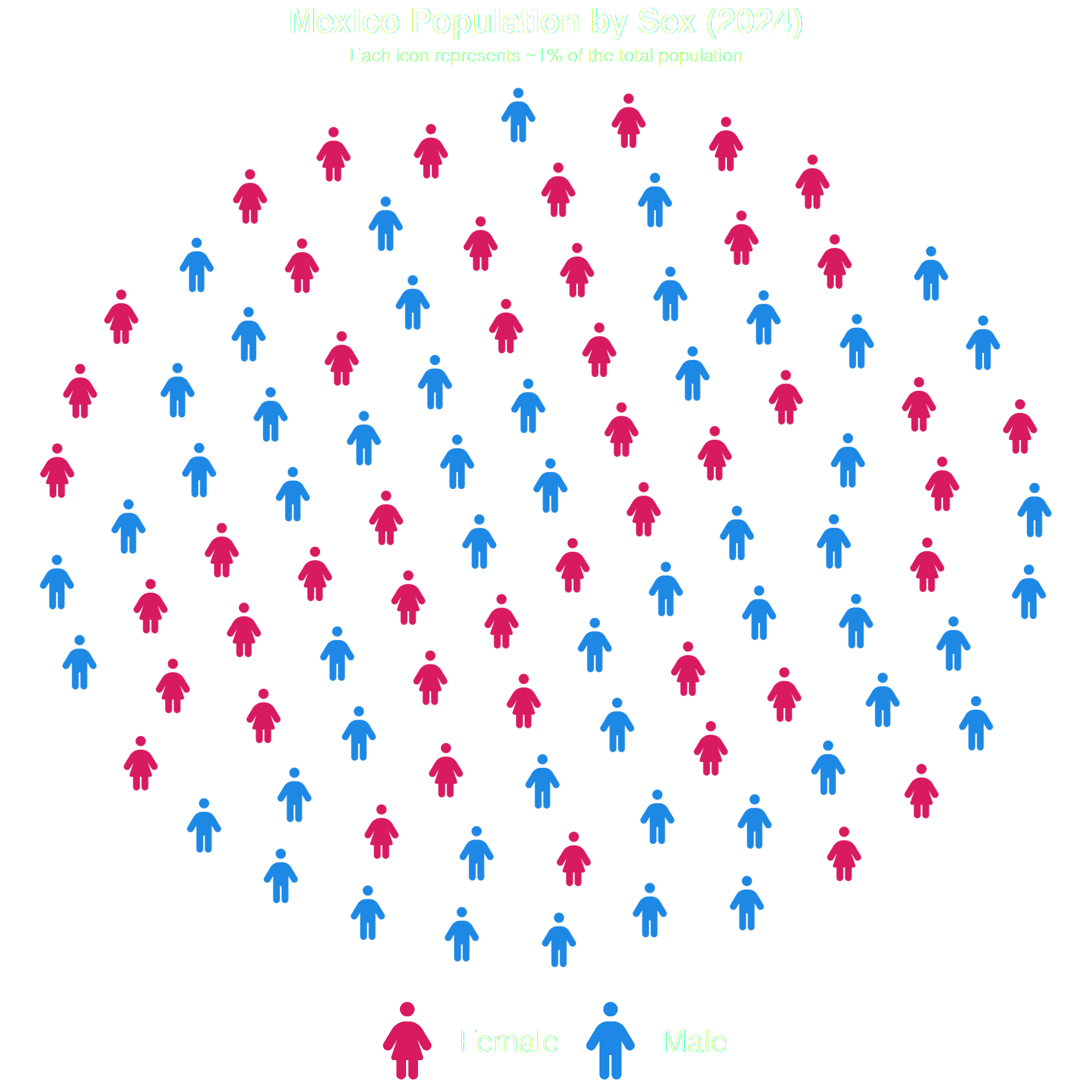
Population distribution by sex (Mexico 2024).

Show the code
library(ggpop)
library(ggplot2)
library(dplyr)

# Search the icons you want to use with fa_icons() and note their names:
fa_icons(query = "male")
fa_icons(query = "female")

df_sex <- data.frame(
  sex = c("Male", "Female"),
  n   = c(63459580, 67401427)
)

df_sex_proc <- process_data(
  data        = df_sex,
  group_var   = sex,
  sum_var     = n,
  sample_size = 100
) %>%
  mutate(icon = case_when(
    type == "Male"   ~ "male",
    type == "Female" ~ "female"
  ))

ggplot(data = df_sex_proc, aes(icon = icon, color = type)) +
  geom_pop(size = 2, 
           dpi = 100,
           legend_icons = TRUE) +
  scale_color_manual(values = c("Male" = "#1E88E5", 
                                "Female" = "#D81B60")) +
  theme_pop() +
  scale_legend_icon(size = 10) +
  theme(plot.title = element_text(color = "white", 
                                  size = 22, face = "bold", hjust = 0.5),
        plot.subtitle = element_text(color = "white", 
                                     size = 12, hjust = 0.5, lineheight = 1.4),
        legend.text = element_text(color = "white",
                                   size = 20),
        legend.title = element_blank(),
        legend.position = "bottom") +
  labs(
    title    = "Mexico Population by Sex (2024)",
    subtitle = "Each icon represents ~1% of the total population",
    color    = "Sex"
  )


Example 3: Education Levels


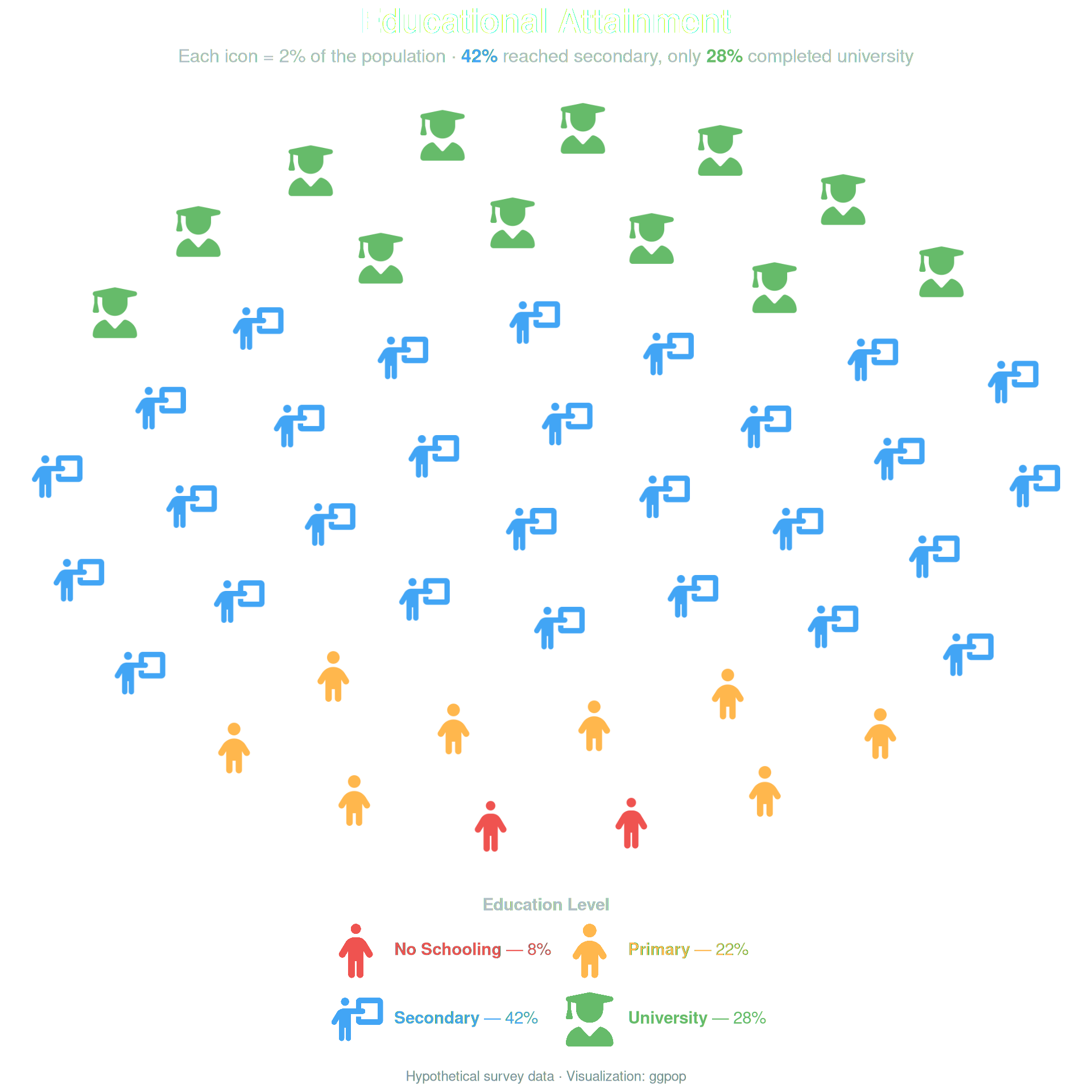
Education attainment across four levels.

Show the code
library(ggpop)
library(ggplot2)
library(dplyr)
library(ggtext)


# Search the icons you want to use with fa_icons() and note their names:
fa_icons(query = "person")
fa_icons(query = "child")
fa_icons(query = "graduate")

df_edu <- data.frame(
  level = c("No Schooling", "Primary", "Secondary", "University"),
  n     = c(8, 22, 42, 28)
)

df_edu_proc <- process_data(
  data        = df_edu,
  group_var   = level,
  sum_var     = n,
  sample_size = 50
) %>%
  mutate(icon = case_when(
    type == "No Schooling" ~ "person",
    type == "Primary"      ~ "child",
    type == "Secondary"    ~ "person-chalkboard",
    type == "University"   ~ "user-graduate",
    TRUE ~ "user"
  ))

df_edu_proc$type <- factor(df_edu_proc$type,
  levels = c("No Schooling", "Primary", "Secondary", "University"))

pal <- c(
  "No Schooling" = "#EF5350",
  "Primary"      = "#FFB74D",
  "Secondary"    = "#42A5F5",
  "University"   = "#66BB6A"
)

# Annotation data for % labels below the grid
df_labels <- data.frame(
  type    = factor(c("No Schooling", "Primary", "Secondary", "University"),
                   levels = c("No Schooling", "Primary", "Secondary", "University")),
  pct     = c("8%", "22%", "42%", "28%"),
  color   = unname(pal)
)

ggplot() +
  geom_pop(
    data         = df_edu_proc,
    aes(icon = icon, color = type),
    size         = 2.2,
    dpi          = 100,
    legend_icons = TRUE,
    arrange      = TRUE
  ) +
  scale_color_manual(values = pal,
    labels = c(
      "No Schooling" = "<span style='color:#EF5350'>**No Schooling** — 8%</span>",
      "Primary"      = "<span style='color:#FFB74D'>**Primary** — 22%</span>",
      "Secondary"    = "<span style='color:#42A5F5'>**Secondary** — 42%</span>",
      "University"   = "<span style='color:#66BB6A'>**University** — 28%</span>"
    )
  ) +
  guides(color = guide_legend(
    ncol           = 2,
    byrow          = TRUE,
    title.position = "top",
    title.hjust    = 0.5,
    label.theme    = element_markdown(size = 11)
  )) +
    theme_pop() +
  theme(
    plot.title       = element_markdown(
      size   = 22, face = "bold", hjust = 0.5,
      color  = "white", margin = margin(b = 6)
    ),
    plot.subtitle    = element_markdown(
      size      = 12, hjust = 0.5, color = "#B0BEC5",
      lineheight = 1.4, margin = margin(b = 18)
    ),
    plot.caption     = element_markdown(
      size  = 9, color = "#78909C", hjust = 0.5,
      margin = margin(t = 14)
    ),
    legend.position  = "bottom",
    legend.title     = element_text(color = "#B0BEC5", size = 11,
                                    face = "bold"),
    legend.margin    = margin(t = 12),
    legend.spacing.x = unit(8, "pt")
  ) +
    theme_transp +
scale_legend_icon(size = 7) +
labs(
  title    = "Educational Attainment",
  subtitle = "Each icon = 2% of the population &nbsp;·&nbsp;
              <span style='color:#42A5F5'>**42%**</span> reached secondary,
              only <span style='color:#66BB6A'>**28%**</span> completed university",
  caption  = "Hypothetical survey data · Visualization: ggpop",
  color    = "Education Level"
)


Example 4: Disease Burden with Dark Theme


Disease burden by category (dark theme).

Show the code
library(ggpop)
library(ggplot2)
library(dplyr)

# Search the icons you want to use with fa_icons() and note their names:
fa_icons(query = "heart")
fa_icons(query = "ribbon")


df_disease <- data.frame(
  condition = c(rep("Cardiovascular", 32), rep("Cancer", 18),
                rep("Respiratory", 14), rep("Diabetes", 12),
                rep("Other", 24)),
  icon      = c(rep("heart-pulse", 32), rep("ribbon", 18),
                rep("lungs", 14), rep("syringe", 12),
                rep("user", 24))
)

df_disease$condition <- factor(df_disease$condition,
  levels = c("Cardiovascular", "Cancer", "Respiratory", "Diabetes", "Other"))

ggplot() +
  geom_pop(
    data         = df_disease,
    aes(icon = icon, color = condition),
    size         = 2,
    dpi          = 100,
    legend_icons = TRUE
  ) +
  scale_color_manual(values = c(
    "Cardiovascular" = "#EF5350",
    "Cancer"         = "#AB47BC",
    "Respiratory"    = "#42A5F5",
    "Diabetes"       = "#FFB74D",
    "Other"          = "#78909C"
  )) +
  theme_pop_dark(bg_color = "#0D1B2A", text_color = "white") +
  labs(
    title    = "Disease Burden by Condition",
    subtitle = "Simulated population of 100 individuals",
    color    = "Condition"
  ) +
  scale_legend_icon(size = 8) +
  theme(
    plot.title       = element_markdown(size = 22, face = "bold", hjust = 0.5),
    plot.subtitle    = element_markdown(size = 12, hjust = 0.5, lineheight = 1.4),
    legend.position  = "bottom",
    legend.title     = element_text(size = 11, face = "bold"),
    legend.text      = element_text(size = 12),
    legend.margin    = margin(t = 12),
    legend.spacing.x = unit(8, "pt")
  )


Example 5: Disability Status with Stroke


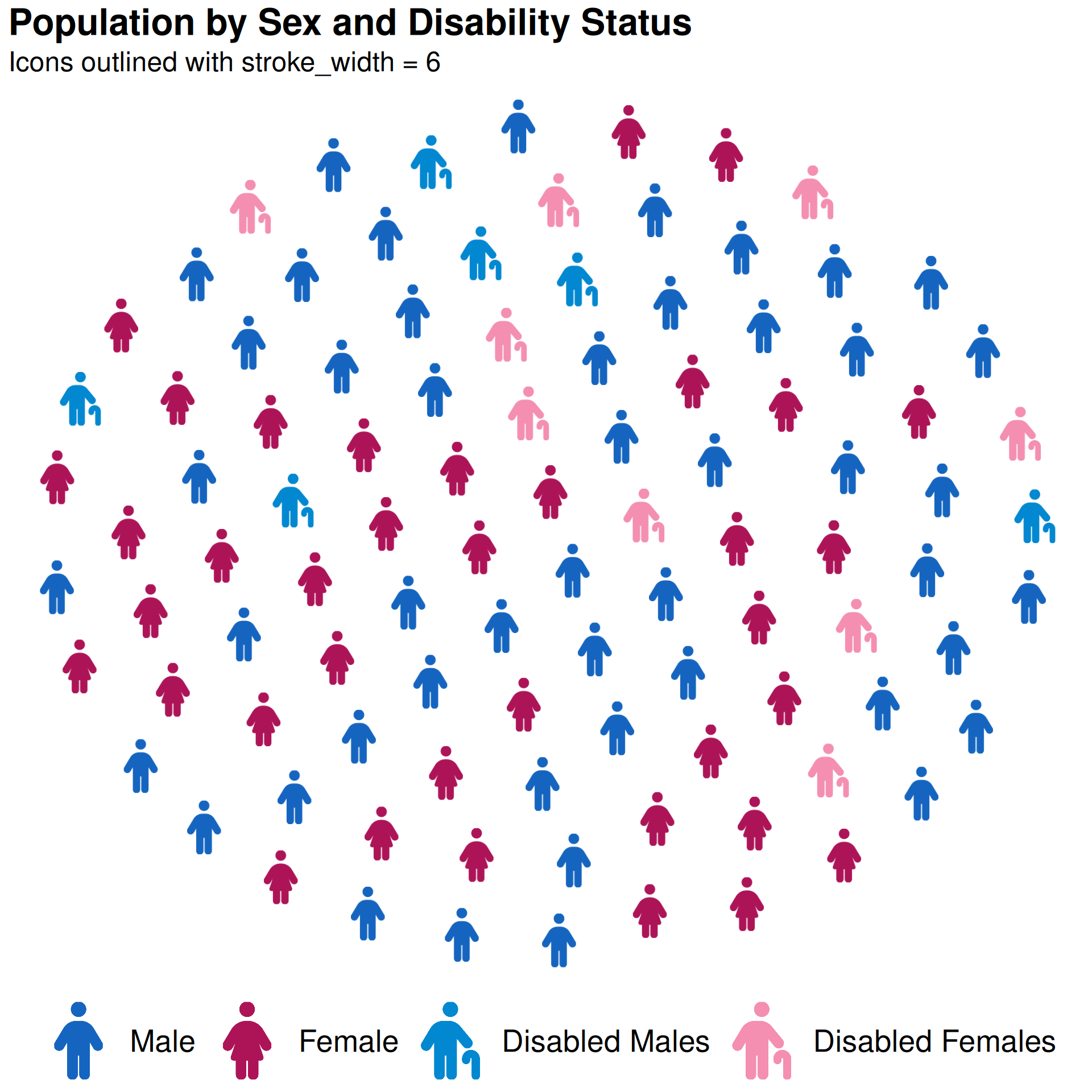
Using stroke_width for icon outlines and arrange = TRUE to group by type.

Show the code
library(ggpop)
library(ggplot2)
library(dplyr)

# Search the icons you want to use with fa_icons() and note their names:
fa_icons(query = "person")


df_disability <- data.frame(
  sex      = c("Male", "Female", "Disabled Males", "Disabled Females"),
  n        = c(46, 44, 5, 5)
)

df_disability_proc <- process_data(
  data        = df_disability,
  group_var   = sex,
  sum_var     = n,
  sample_size = 100
) %>%
  mutate(icon = case_when(
    type == "Male"             ~ "male",
    type == "Female"           ~ "female",
    type == "Disabled Males"   ~ "person-cane",
    type == "Disabled Females" ~ "person-cane"
  ))


#Add levels to show first Male, Female, then Disabled

df_disability_proc$type <- factor(df_disability_proc$type, 
  levels = c("Male", "Female", "Disabled Males", "Disabled Females"))

ggplot(data = df_disability_proc,
    aes(icon = icon, color = type)) +
  geom_pop(size         = 2,
           dpi          = 100,
           arrange      = TRUE,
           legend_icons = TRUE,
           stroke_width = 6) +
  scale_color_manual(
    values = c(
      "Male"             = "#1565C0",
      "Female"           = "#AD1457",
      "Disabled Males"   = "#0288D1",
      "Disabled Females" = "#F48FB1"
    )
  ) +
  theme_pop(legend_position = "bottom") +
  theme(legend.text = element_text(size = 20)) +
  scale_legend_icon(size = 10) +
  labs(
    title    = "Population by Sex and Disability Status",
    subtitle = "Icons outlined with stroke_width = 6",
    color    = "Group"
  )

Example 6: 100 Most Common Names in Mexico

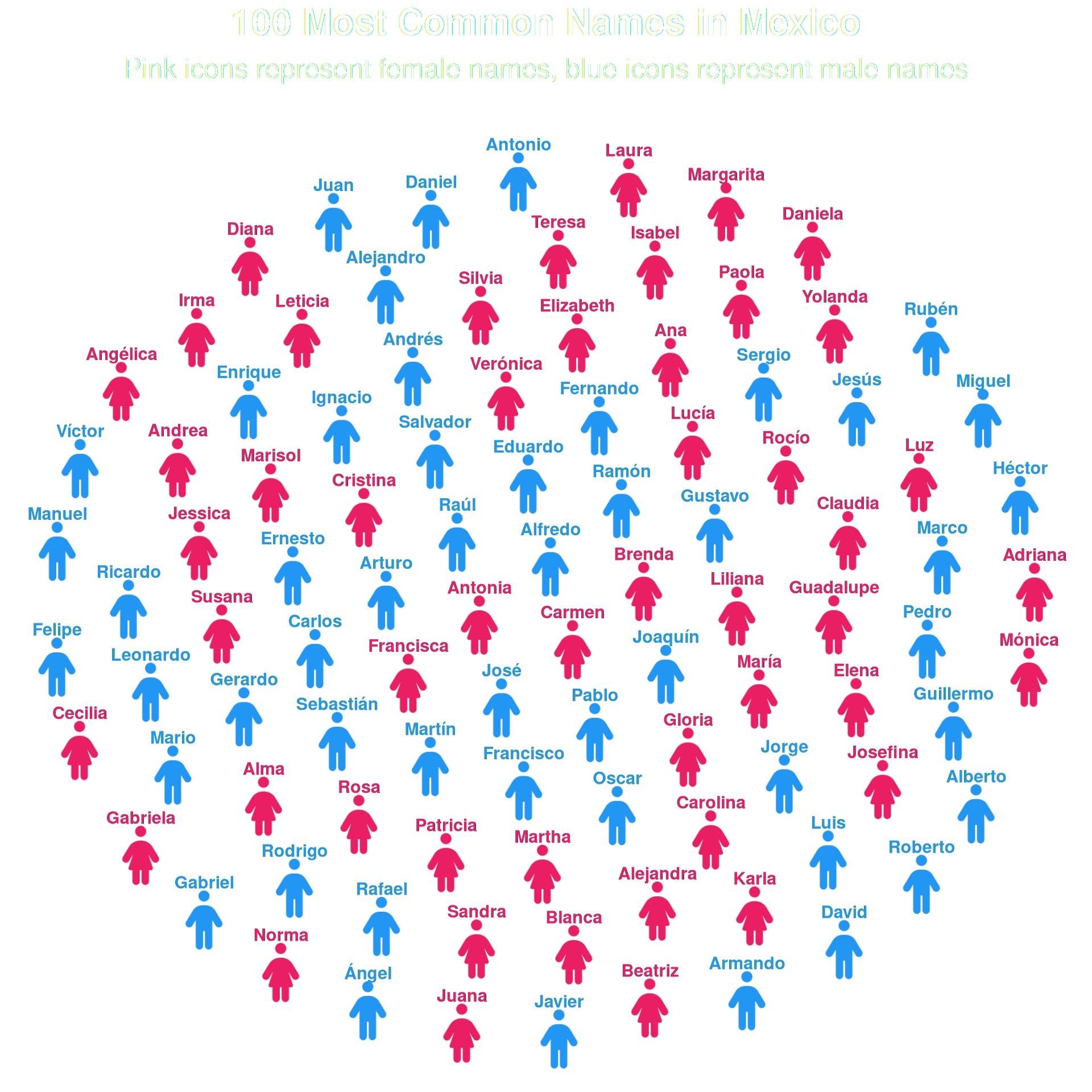
Adding text labels to icons with geom_text() and check_overlap = TRUE to prevent overlap.

Show the code
df_labeled <- data.frame(
  name = c(
    # Female names (50)
    "María", "Guadalupe", "Juana", "Margarita", "Francisca",
    "Teresa", "Rosa", "Antonia", "Ana", "Isabel",
    "Carmen", "Josefina", "Laura", "Verónica", "Patricia",
    "Leticia", "Silvia", "Elizabeth", "Adriana", "Martha",
    "Elena", "Gabriela", "Alejandra", "Gloria", "Claudia",
    "Lucía", "Beatriz", "Daniela", "Mónica", "Rocío",
    "Alma", "Karla", "Yolanda", "Diana", "Sandra",
    "Cecilia", "Paola", "Norma", "Angélica", "Irma",
    "Liliana", "Brenda", "Jessica", "Susana", "Blanca",
    "Marisol", "Carolina", "Luz", "Cristina", "Andrea",
    # Male names (50)
    "José", "Juan", "Luis", "Miguel", "Carlos",
    "Francisco", "Antonio", "Jesús", "Pedro", "Manuel",
    "Alejandro", "Jorge", "Rafael", "Roberto", "Fernando",
    "Daniel", "Ricardo", "Javier", "Alberto", "Sergio",
    "Raúl", "Enrique", "Guillermo", "Oscar", "Gerardo",
    "Arturo", "Héctor", "Eduardo", "Armando", "David",
    "Víctor", "Pablo", "Ángel", "Ramón", "Andrés",
    "Mario", "Salvador", "Ignacio", "Gustavo", "Alfredo",
    "Rubén", "Marco", "Rodrigo", "Joaquín", "Martín",
    "Gabriel", "Felipe", "Ernesto", "Leonardo", "Sebastián"
  ),
  gender = c(rep("Female", 50), rep("Male", 50)),
  icon = c(rep("person-dress", 50), rep("person", 50))
)

df_labeled$gender <- factor(df_labeled$gender,
                            levels = c("Female", "Male"))

ggplot(data = df_labeled, aes(icon = icon, color = gender)) +
  geom_pop(size = 2, dpi = 100, show.legend = FALSE, ncol = 10) +
  geom_text(
    aes(label = name),
    nudge_y       = 0.08,
    size          = 4,
    fontface      = "bold",
    check_overlap = TRUE
  ) +
  scale_color_manual(values = c(
    "Female" = "#E91E63",
    "Male"   = "#2196F3"
  )) +
  theme_pop(base_size = 20) +
  theme(
    plot.title    = element_text(color = "white", hjust = .5),
    plot.subtitle = element_text(color = "white", hjust = .5),
    legend.position = "none"
  ) +
  labs(
    title    = "100 Most Common Names in Mexico",
    subtitle = "Pink icons represent female names, blue icons represent male names"
  )


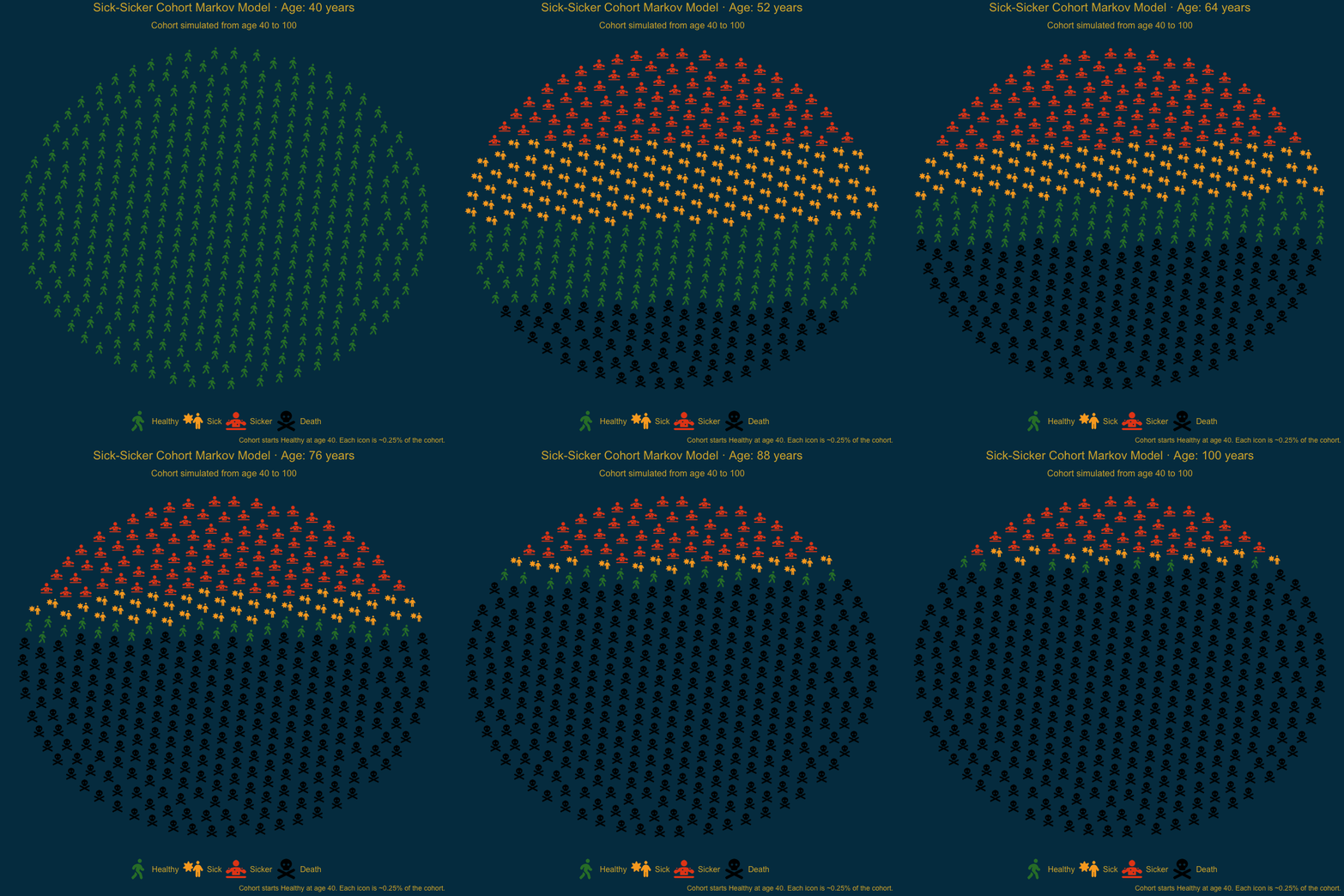
Example 7: Animated Markov Cohort (Sick-Sicker)

Animated Sick-Sicker model tracking disease progression from age 40 to 100 across four states: Healthy, Sick, Sicker, and Death.

Show the code
# Load package functions

library(ggpop)
library(ggplot2)
library(dplyr)
library(tidyr)
library(gganimate)

# -------------------------------
# 1) Cohort Markov model inputs
# -------------------------------
states <- c("Healthy", "Sick", "Sicker", "Death")
age_start <- 40
age_end <- 100
n_cycles <- age_end - age_start

# Transition probability matrix (rows = current state, cols = next state)
# Healthy -> Healthy/Sick/Sicker/Death
# Sick    -> Healthy/Sick/Sicker/Death
# Sicker  -> Healthy/Sick/Sicker/Death
# Death   -> Death (absorbing)
m_P <- matrix(
  c(
    0.85, 0.12, 0.02, 0.01,
    0.08, 0.85, 0.05, 0.02,
    0.00, 0.00, 0.95, 0.05,
    0.00, 0.00, 0.00, 1.00
  ),
  nrow = length(states),
  byrow = TRUE,
  dimnames = list(states, states)
)

stopifnot(all(abs(rowSums(m_P) - 1) < 1e-10))

# ---------------------------------
# 2) Cohort trace from age 40 to 100
# ---------------------------------
m_trace <- matrix(
  0,
  nrow = n_cycles + 1,
  ncol = length(states),
  dimnames = list(cycle = 0:n_cycles, state = states)
)

# Initial cohort distribution at age 40
m_trace[1, ] <- c(1, 0, 0, 0)

for (t in seq_len(n_cycles)) {
  m_trace[t + 1, ] <- m_trace[t, ] %*% m_P
}

# Long-format cohort proportions by age
cohort_long <- as.data.frame(m_trace) %>%
  mutate(cycle = 0:n_cycles,
         age = age_start + cycle) %>%
  pivot_longer(
    cols = all_of(states),
    names_to = "state",
    values_to = "prop"
  )

# ------------------------------------------------------
# 3) Convert each cycle's proportions to icon-level data
# ------------------------------------------------------
# process_data() samples icons within each age (high_group_var = "age")
# sample_size = 400 means each icon is ~0.25% of the cohort in each frame
set.seed(2026)
df_icons <- process_data(
  data = cohort_long,
  high_group_var = "age",
  group_var = state,
  sum_var = prop,
  sample_size = 400
) %>%
  mutate(
    age = as.integer(group),
    state = factor(type, levels = states),
    icon = case_when(
      state == "Healthy" ~ "person-walking",
      state == "Sick" ~ "person-burst",
      state == "Sicker" ~ "person-dots-from-line",
      state == "Death" ~ "skull-crossbones"
    )
  )

# --------------------
# 4) Animated ggpop plot
# --------------------
p_anim <- ggplot(df_icons, aes(icon = icon, color = state)) +
  geom_pop(
    size = 1.1,
    arrange = TRUE,
    legend_icons = TRUE,
    seed = 2026,
    dpi = 100
  ) +
  scale_color_manual(
    values = c(
      "Healthy" = "#2E7D32",
      "Sick" = "#F9A825",
      "Sicker" = "#E64A19",
      "Death" = "black"
    )
  ) +
  theme_pop(base_size = 20) +
  theme(
    legend.position = "bottom",
    legend.title = element_blank(),
    plot.background = element_rect(color = "#013A4F", fill = "#013A4F"), # Transparent plot background
    panel.background = element_rect(color = "#013A4F", fill = "#013A4F"), # Transparent panel
    legend.text = element_text(color = "#D4AF37"),
    plot.title = element_text(color = "#D4AF37", face = "bold", hjust = 0.5),
    plot.subtitle = element_text(color = "#D4AF37", hjust = 0.5),
    plot.caption = element_text(color = "#D4AF37")
  ) +
  scale_legend_icon(size = 8) +
  labs(
    title = "Sick-Sicker Cohort Markov Model \u00b7 Age: {closest_state} years",
    subtitle = "Cohort simulated from age 40 to 100",
    caption = "Cohort starts Healthy at age 40. Each icon is ~0.25% of the cohort."
  )  +
  transition_states(
    states = age,
    transition_length = 1,
    state_length = 1,
    wrap = FALSE
  ) +
  ease_aes("linear")

# Optional: save the animation
#anim_save("sick_sicker_animation.gif", anim)

Markov Model Simulation

cowplot — Health Survey Dashboard


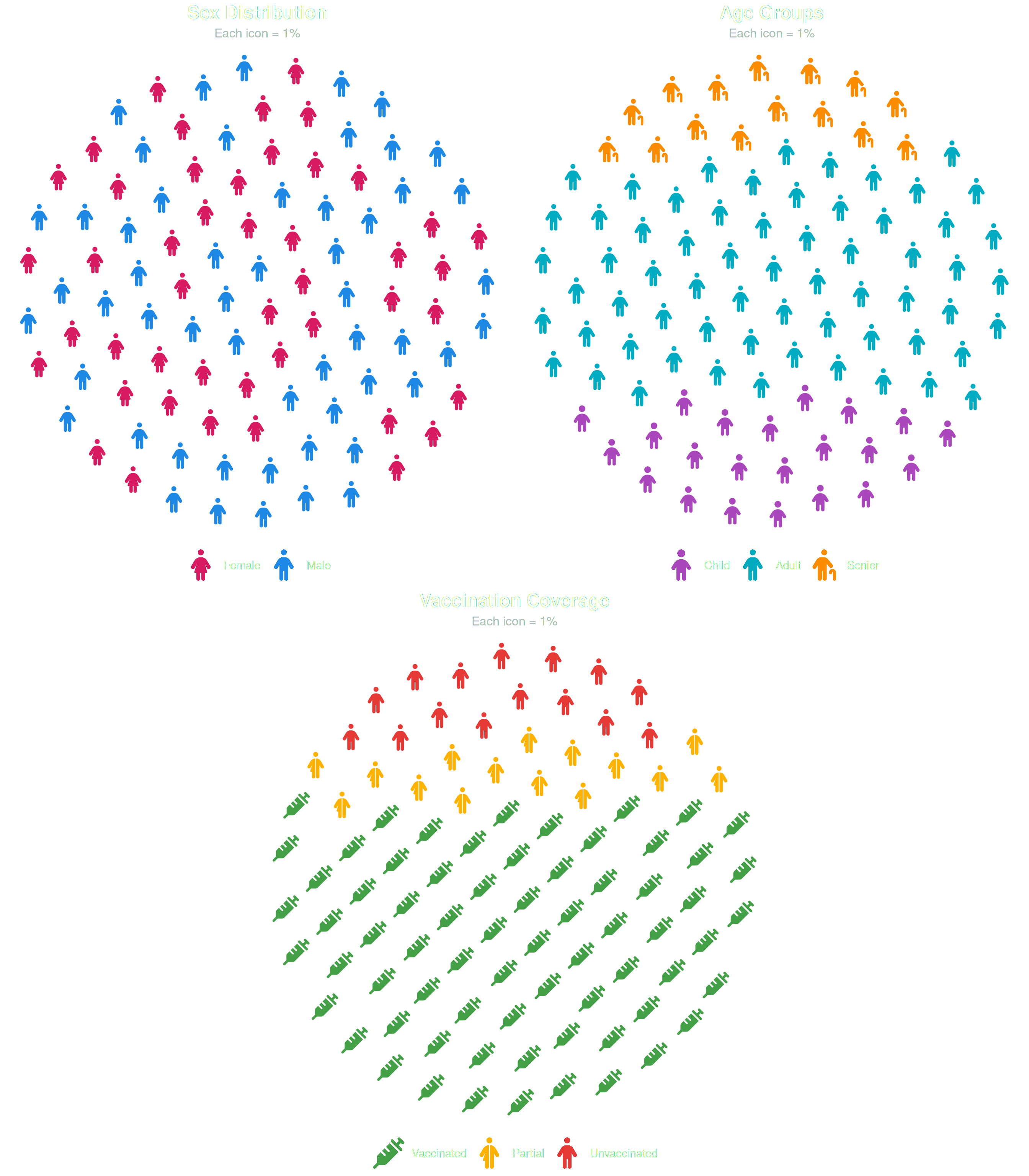
Combining multiple geom_pop() panels with cowplot: two charts on top (sex, age groups), one centered below (vaccination).

Show the code
library(ggpop)
library(ggplot2)
library(dplyr)
library(cowplot)


# Search the icons you want to use with fa_icons() and note their names:
fa_icons(query = "person")

# --- Plot 1: Sex distribution ---
df_sex_cw <- data.frame(
  sex = c("Male", "Female"),
  n   = c(48, 52)
)

df_sex_cw_proc <- process_data(
  data        = df_sex_cw,
  group_var   = sex,
  sum_var     = n,
  sample_size = 100
) %>%
  mutate(icon = case_when(
    type == "Male"   ~ "male",
    type == "Female" ~ "female"
  ))

p1 <- ggplot(data = df_sex_cw_proc, aes(icon = icon, color = type)) +
  geom_pop(size = 1.8, dpi = 100, legend_icons = TRUE) +
  scale_color_manual(values = c("Male" = "#1E88E5", "Female" = "#D81B60")) +
  theme_pop() +
  scale_legend_icon(size = 6) +
  theme(
    legend.position = "bottom",
    legend.title    = element_blank(),
    legend.text     = element_text(size = 11, color = "white"),
    plot.title      = element_text(size = 13, face = "bold", hjust = 0.5, color = "white"),
    plot.subtitle   = element_text(size = 9,  hjust = 0.5, color = "#B0BEC5")
  ) +
  labs(title = "Sex Distribution", subtitle = "Each icon = 1%")

# --- Plot 2: Age groups ---
df_age <- data.frame(
  group = c("Child", "Adult", "Senior"),
  n     = c(22, 63, 15)
)

df_age_proc <- process_data(
  data        = df_age,
  group_var   = group,
  sum_var     = n,
  sample_size = 100
) %>%
  mutate(icon = case_when(
    type == "Child"  ~ "child",
    type == "Adult"  ~ "person",
    type == "Senior" ~ "person-cane"
  ))

df_age_proc$type <- factor(df_age_proc$type,
  levels = c("Child", "Adult", "Senior"))

p2 <- ggplot(data = df_age_proc, aes(icon = icon, color = type)) +
  geom_pop(size = 1.8, dpi = 100, legend_icons = TRUE, arrange = TRUE) +
  scale_color_manual(values = c(
    "Child"  = "#AB47BC",
    "Adult"  = "#00ACC1",
    "Senior" = "#FB8C00"
  )) +
  theme_pop() +
  scale_legend_icon(size = 6) +
  theme(
    legend.position = "bottom",
    legend.title    = element_blank(),
    legend.text     = element_text(size = 11, color = "white"),
    plot.title      = element_text(size = 13, face = "bold", hjust = 0.5, color = "white"),
    plot.subtitle   = element_text(size = 9,  hjust = 0.5, color = "#B0BEC5")
  ) +
  labs(title = "Age Groups", subtitle = "Each icon = 1%")

# --- Plot 3: Vaccination coverage (centered below) ---
df_vaccine <- data.frame(
  status = c("Vaccinated", "Partial", "Unvaccinated"),
  n      = c(70, 15, 15)
)

df_vaccine_proc <- process_data(
  data        = df_vaccine,
  group_var   = status,
  sum_var     = n,
  sample_size = 100
) %>%
  mutate(icon = case_when(
    type == "Vaccinated"   ~ "syringe",
    type == "Partial"      ~ "person-half-dress",
    type == "Unvaccinated" ~ "person"
  ))

df_vaccine_proc$type <- factor(df_vaccine_proc$type,
  levels = c("Vaccinated", "Partial", "Unvaccinated"))

p3 <- ggplot(data = df_vaccine_proc, aes(icon = icon, color = type)) +
  geom_pop(size = 1.8, dpi = 100, legend_icons = TRUE, arrange = TRUE) +
  scale_color_manual(values = c(
    "Vaccinated"   = "#43A047",
    "Partial"      = "#FFB300",
    "Unvaccinated" = "#E53935"
  )) +
  theme_pop() +
  scale_legend_icon(size = 6) +
  theme(
    legend.position = "bottom",
    legend.title    = element_blank(),
    legend.text     = element_text(size = 11, color = "white"),
    plot.title      = element_text(size = 13, face = "bold", hjust = 0.5, color = "white"),
    plot.subtitle   = element_text(size = 9,  hjust = 0.5, color = "#B0BEC5")
  ) +
  labs(title = "Vaccination Coverage", subtitle = "Each icon = 1%")

# Arrange: 2 on top, 1 centered below
top_row    <- plot_grid(p1, p2, ncol = 2)
bottom_row <- plot_grid(NULL, p3, NULL, ncol = 3, rel_widths = c(0.5, 1, 0.5))
plot_grid(top_row, bottom_row, nrow = 2)


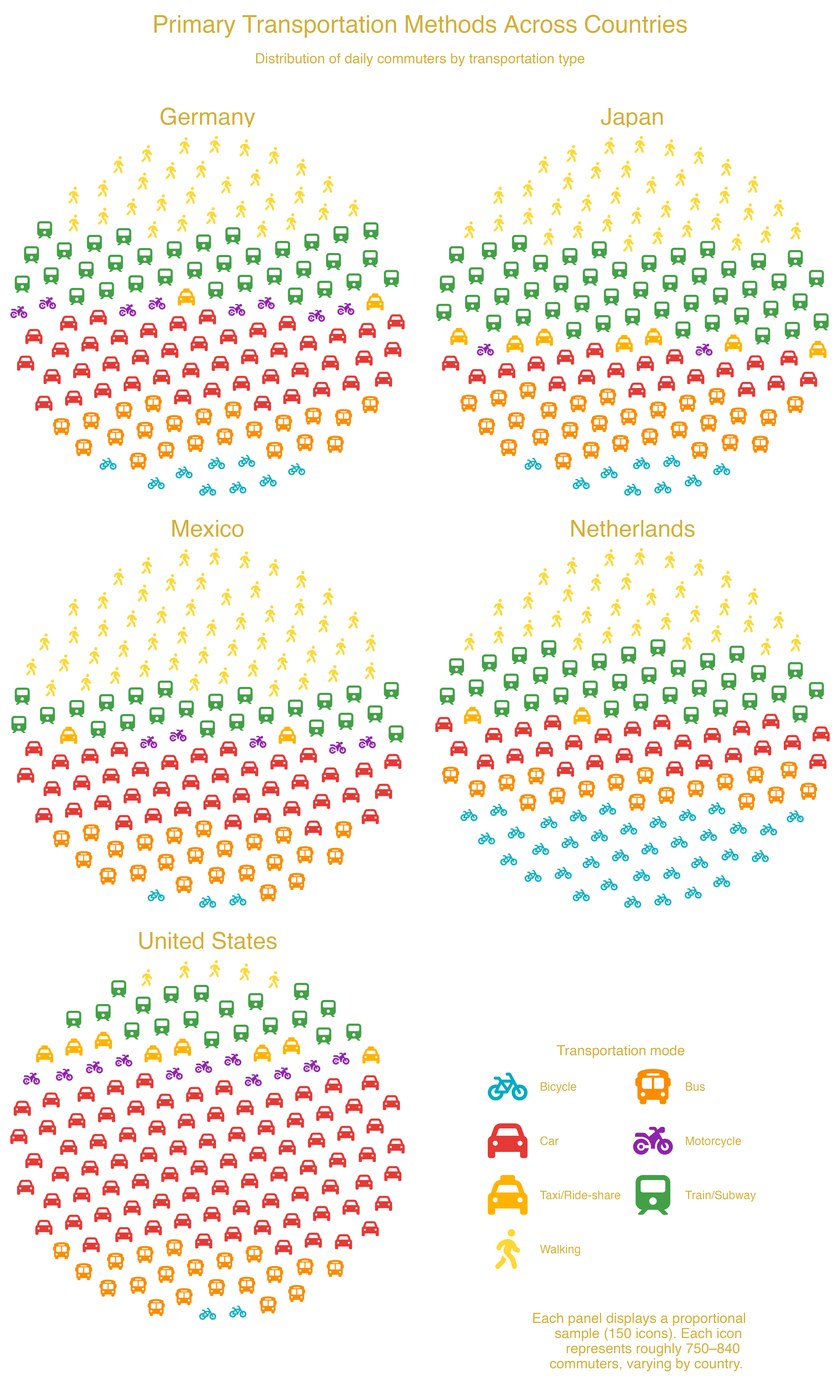
facet_wrap — Transportation Methods Across US Cities


Transportation methods across cities using facet_wrap(): each panel shows one city’s distribution of commute modes.

Show the code
# Example: Transportation Methods Across Cities with 7 Icon Groups
library(ggplot2)
library(dplyr)

# Search the icons you want to use with fa_icons() and note their names:
fa_icons(query = "car")
fa_icons(query = "train")
fa_icons(query = "bicycle")

# 1. Create sample data for transportation methods across different countries
df_transport <- data.frame(
  country = rep(c("🇺🇸 United States", "🇩🇪 Germany", "🇳🇱 Netherlands",
                  "🇯🇵 Japan", "🇲🇽 Mexico"), each = 7),
  method  = rep(c("car", "bus", "train", "bicycle",
                  "motorcycle", "walking", "taxi"), 5),
            # United States (car-dominant, low walking)
  value = c(70000, 15000, 12000,  6000,  8000,  5000,  9000,
            # Germany (balanced multimodal)
            35000, 20000, 25000, 15000,  4000, 22000,  4000,
            # Netherlands (bike + walking high)
            20000, 12000, 18000, 35000,  3000, 25000,  2000,
            # Japan (transit + walking high)
            15000, 18000, 40000,  5000,  2000, 30000,  3000,
            # Mexico (walking high; mixed modes)
            30000, 20000, 18000,  4000,  5000, 35000,  3000))

# 2. Process the data for each country
df_transport_prop <- process_data(
  data           = df_transport,
  group_var      = method,
  sum_var        = value,
  sample_size    = 150,
  high_group_var = "country"
)

# 3. Assign Font Awesome icons to transportation methods
df_transport_prop <- df_transport_prop %>%
  mutate(icon = case_when(
    type == "car"        ~ "car",
    type == "bus"        ~ "bus",
    type == "train"      ~ "train",
    type == "bicycle"    ~ "bicycle",
    type == "motorcycle" ~ "motorcycle",
    type == "walking"    ~ "person-walking",
    type == "taxi"       ~ "taxi"
  ))

# 4. Plot with facet_wrap + legend placed inside bottom-right
ggplot(data = df_transport_prop,
    aes(icon = icon, group = type, color = type)) +
  geom_pop(size = 1.5, arrange = TRUE) +
  facet_wrap(~ group, ncol = 2) +
  theme_void(base_size = 26) +
  labs(title    = "Primary Transportation Methods Across Countries",
       subtitle = "\nDistribution of daily commuters by transportation type",
       caption = paste(
      strwrap(
        "Each panel displays a proportional sample (150 icons).
        Each icon represents roughly 750–840 commuters, varying by country.",
        width = 35), collapse = "\n")) +
  theme(
    legend.position = c(0.9, 0.05),
    legend.justification = c(1, 0),
    legend.direction = "horizontal",
    legend.box = "horizontal",
    strip.text = element_text(size = 30, color = "#D4AF38"),
    legend.text = element_text(color = "#D4AF38", size = 15),
    plot.title    = element_text(hjust = 0.5, face = "bold", color = "#D4AF38"),
    plot.subtitle = element_text(hjust = 0.5, color = "#D4AF38", size = 18,
                                 margin = margin(b = 50)),
    plot.caption = element_text(
      hjust = .85,
      vjust = 10,
      size = 18,
      color = "#D4AF38"
    ),
    legend.title = element_text(
      color = "#D4AF38",
      size  = 18,
      face  = "bold",
      margin = margin(b = 10)
    ),
    legend.box.spacing = unit(4, "pt")
  ) +
  scale_color_manual(
    name = "Transportation mode",
    values = c(
      "car"        = "#E53935",
      "bus"        = "#FB8C00",
      "train"      = "#43A047",
      "bicycle"    = "#00ACC1",
      "motorcycle" = "#8E24AA",
      "walking"    = "#FDD835",
      "taxi"       = "#FFB300"
    ),
    labels = c(
      "car"        = "Car",
      "bus"        = "Bus",
      "train"      = "Train/Subway",
      "bicycle"    = "Bicycle",
      "motorcycle" = "Motorcycle",
      "walking"    = "Walking",
      "taxi"       = "Taxi/Ride-share")) +
  guides(
    color = guide_legend(
      ncol = 2,
      byrow = TRUE,
      title.position = "top",
      title.hjust = 0.5)) +
  scale_legend_icon(size = 10)

Example Plot facet


facet_geo — Gun Violence Across US States


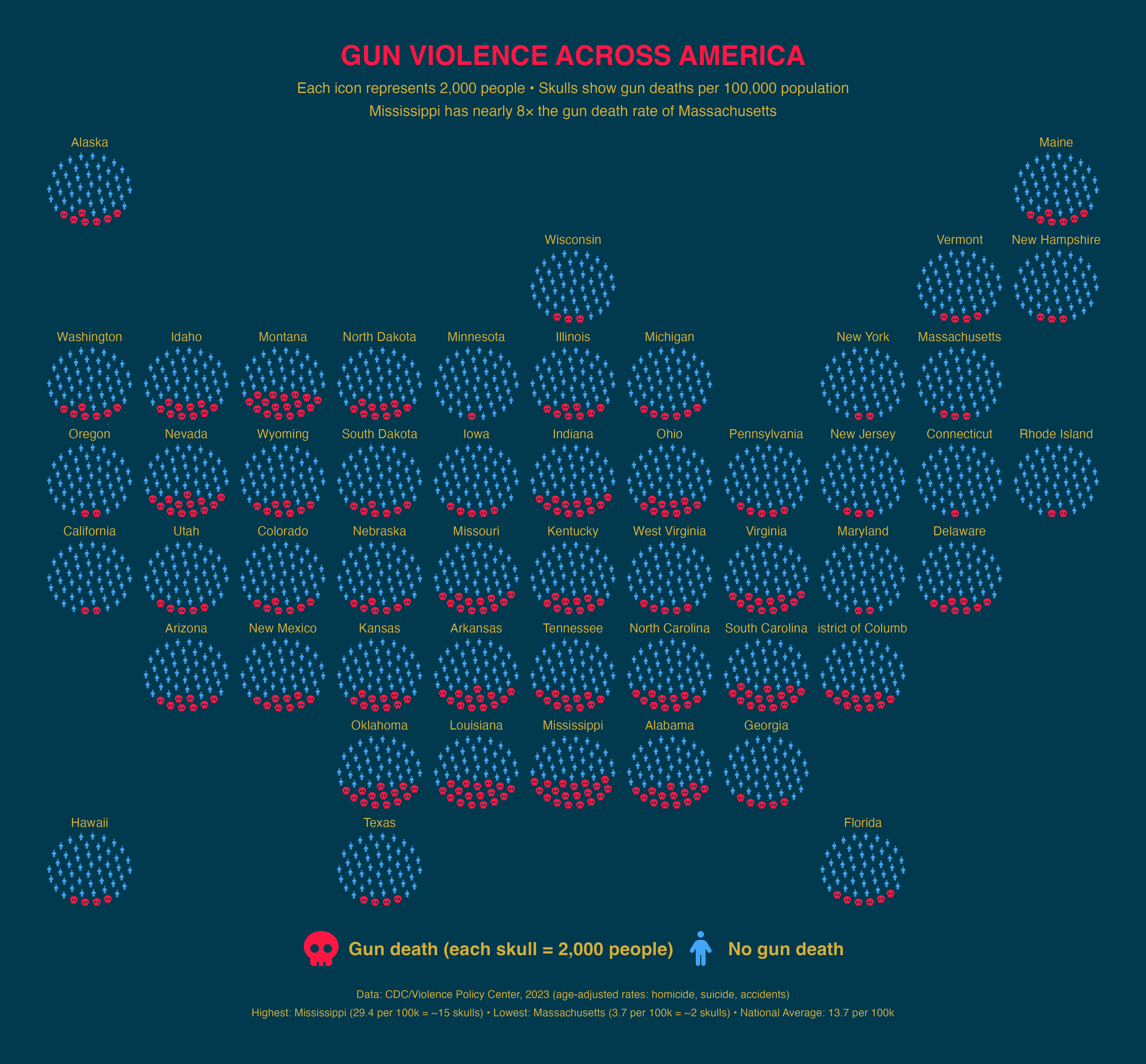
Gun deaths per 100,000 people (2023 CDC data) by US state using geofacet for geographic placement.

Note: According to issue #488 from geofacet package

“You may want to install ggplot2 v3.5.2 until it is fixed so the plot can work. Note that this is the case for all grids, not the US states grid alone (so if possible, please update the issue title).”.

devtools::install_version(package = "ggplot2",
                          version = "3.5.2",
                          repos = "http://cran.us.r-project.org")
Show the code
library(sf); library(dplyr); library(geofacet)


url <- "https://raw.githubusercontent.com/holtzy/D3-graph-gallery/7a5e5e1b1009312506ebd873d7858fa424c14b68/DATA/us_states_hexgrid.geojson.json"

states_in_hex <- read_sf(url) %>%
  mutate(google_name = gsub(" \\(United States\\)", "", google_name)) %>%
  st_drop_geometry() %>%
  transmute(state = iso3166_2) %>%
  distinct()

df_rates <- states_in_hex %>%
  mutate(gun_death_rate_per_100k = case_when(
    state == "AL" ~ 25.6, state == "AK" ~ 23.5, state == "AZ" ~ 18.5, state == "AR" ~ 21.9,
    state == "CA" ~  8.0, state == "CO" ~ 16.6, state == "CT" ~  6.2, state == "DE" ~ 12.0,
    state == "FL" ~ 13.7, state == "GA" ~ 18.6, state == "HI" ~  4.9, state == "ID" ~ 17.9,
    state == "IL" ~ 13.5, state == "IN" ~ 18.3, state == "IA" ~ 10.5, state == "KS" ~ 16.3,
    state == "KY" ~ 18.4, state == "LA" ~ 28.3, state == "ME" ~ 14.0, state == "MD" ~ 12.3,
    state == "MA" ~  3.7, state == "MI" ~ 13.9, state == "MN" ~  8.9, state == "MS" ~ 29.4,
    state == "MO" ~ 21.4, state == "MT" ~ 21.5, state == "NE" ~ 10.6, state == "NV" ~ 18.4,
    state == "NH" ~  9.6, state == "NJ" ~  4.6, state == "NM" ~ 25.3, state == "NY" ~  4.7,
    state == "NC" ~ 16.4, state == "ND" ~ 12.8, state == "OH" ~ 15.0, state == "OK" ~ 19.9,
    state == "OR" ~ 14.2, state == "PA" ~ 13.6, state == "RI" ~  4.8, state == "SC" ~ 19.1,
    state == "SD" ~ 12.3, state == "TN" ~ 22.0, state == "TX" ~ 14.9, state == "UT" ~ 14.8,
    state == "VT" ~ 12.0, state == "VA" ~ 13.8, state == "WA" ~ 13.0, state == "WV" ~ 16.8,
    state == "WI" ~ 12.7, state == "WY" ~ 21.5, state == "DC" ~ 28.5,
    TRUE ~ 13.7
  )) %>%
  mutate(deaths_count = round(gun_death_rate_per_100k))

df_people <- df_rates %>%
  group_by(state, deaths_count, gun_death_rate_per_100k) %>%
  reframe(
    icon_id = 1:100,
    status  = if_else(icon_id <= unique(deaths_count), "gun death", "no gun death")
  )

df_hex_prop <- process_data(
  data = df_people, group_var = status, sum_var = NULL,
  sample_size = 50, high_group_var = "state"
) %>%
  mutate(icon = if_else(type == "gun death", "skull", "person")) %>%
  rename(code = group)

ggplot(df_hex_prop, aes(icon = icon, group = type, color = type)) +
  geom_pop(size = 3.5, arrange = TRUE, facet = "code") +
  geofacet::facet_geo(~ code, grid = "us_state_grid3", label = "name") +
  scale_color_manual(
    values = c("gun death" = "#FF1744", "no gun death" = "#42A5F5"),
    labels = c("Gun death (each skull = 2,000 people)", "No gun death")
  ) +
  scale_legend_icon(size = 6) +
  theme_void(base_size = 14) +
  labs(
    title    = "GUN VIOLENCE ACROSS AMERICA",
    subtitle = "Each icon represents 2,000 people • Skulls show gun deaths per 100,000 population\nMississippi has nearly 8× the gun death rate of Massachusetts",
    caption  = "Data: CDC/Violence Policy Center, 2023 (age-adjusted rates: homicide, suicide, accidents)\nHighest: Mississippi (29.4 per 100k = ~15 skulls) • Lowest: Massachusetts (3.7 per 100k = ~2 skulls) • National Average: 13.7 per 100k"
  ) +
  theme(
    plot.background  = element_blank(), panel.background = element_blank(),
    legend.position  = "bottom",       legend.title     = element_blank(),
    legend.background = element_blank(), legend.key      = element_blank(),
    legend.text      = element_text(color = "#D4AF37", size = 16, face = "bold"),
    legend.margin    = margin(t = 15, b = 5),
    strip.text       = element_text(size = 12, color = "#D4AF37", margin = margin(b = 4)),
    plot.title       = element_text(hjust = 0.5, face = "bold", size = 24, color = "#FF1744",
                                    margin = margin(b = 10), family = "sans"),
    plot.subtitle    = element_text(hjust = 0.5, size = 13, lineheight = 1.3,
                                    color = "#D4AF37", margin = margin(b = 15)),
    plot.caption     = element_text(hjust = 0.5, size = 9.5, color = "#D4AF37",
                                    lineheight = 1.4, margin = margin(t = 15)),
    plot.margin      = margin(t = 40, r = 40, b = 40, l = 40)
  )

Example Plot geofacet


gifski — A World Grown Older (png animation)


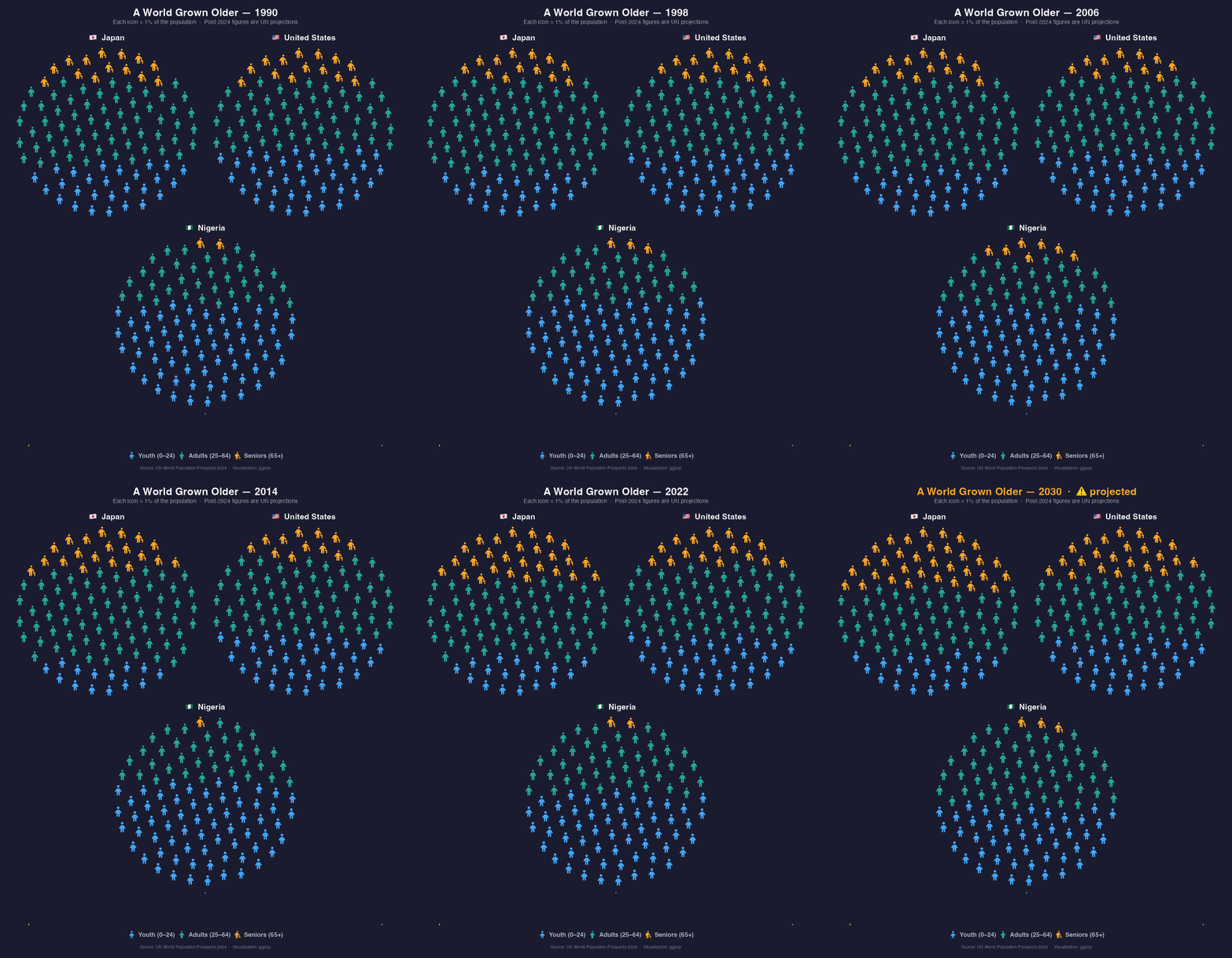
Age structure changes across Japan, the United States, and Nigeria animated with patchwork and gifski.

Show the code
library(ggpop)
library(ggplot2)
library(dplyr)
library(patchwork)
library(gifski)

# Search the icons you want to use with fa_icons() and note their names:
fa_icons(query = "person")


set.seed(42)

v_years <- as.character(seq(1990, 2030, by = 1))

interp <- function(years_key, vals_key, years_out) {
  round(approx(years_key, vals_key, xout = years_out)$y)
}

make_country_df <- function(years_key, youth_key, adult_key, senior_key) {
  yrs    <- seq(1990, 2030)
  youth  <- interp(years_key, youth_key,  yrs)
  senior <- interp(years_key, senior_key, yrs)
  adult  <- 100 - youth - senior
  data.frame(
    year      = rep(as.character(yrs), each = 3),
    age_group = rep(c("Youth (0-24)", "Adults (25-64)", "Seniors (65+)"), length(yrs)),
    n         = as.vector(rbind(youth, adult, senior))
  )
}

ky <- c(1990, 1995, 2000, 2005, 2010, 2015, 2020, 2025, 2030)

df_japan <- make_country_df(ky,
                            youth_key  = c(27, 24, 20, 19, 18, 18, 17, 17, 16),
                            adult_key  = c(61, 63, 64, 63, 62, 59, 56, 54, 52),
                            senior_key = c(12, 13, 16, 18, 20, 23, 27, 29, 32)
)
df_usa <- make_country_df(ky,
                          youth_key  = c(36, 36, 35, 34, 33, 32, 30, 29, 28),
                          adult_key  = c(52, 52, 52, 53, 53, 53, 54, 53, 52),
                          senior_key = c(12, 12, 13, 13, 14, 15, 16, 18, 20)
)
df_nigeria <- make_country_df(ky,
                              youth_key  = c(65, 63, 61, 60, 58, 57, 56, 55, 53),
                              adult_key  = c(32, 33, 35, 36, 38, 39, 40, 41, 42),
                              senior_key = c( 3,  4,  4,  4,  4,  4,  4,  4,  5)
)

v_age_groups <- c("Youth (0-24)", "Adults (25-64)", "Seniors (65+)")
v_colors <- c(
  "Youth (0-24)"   = "#42A5F5",
  "Adults (25-64)" = "#26A69A",
  "Seniors (65+)"  = "#FFA726"
)
v_bg <- "#1B1B2F"

proc_country <- function(df) {
  set.seed(42)
  process_data(
    data           = df,
    group_var      = age_group,
    sum_var        = n,
    sample_size    = 100,
    high_group_var = "year"
  ) %>%
    rename(year_label = group) %>%
    mutate(
      icon = case_when(
        type == "Youth (0-24)"   ~ "child",
        type == "Adults (25-64)" ~ "person",
        type == "Seniors (65+)"  ~ "person-cane"
      ),
      type = factor(type, levels = v_age_groups)
    )
}

df_japan_proc   <- proc_country(df_japan)
df_usa_proc     <- proc_country(df_usa)
df_nigeria_proc <- proc_country(df_nigeria)

make_pop_plot <- function(df_proc, yr, country_label) {
  df_proc %>%
    filter(year_label == yr) %>%
    ggplot(aes(icon = icon, color = type)) +
    geom_pop(size = 2, dpi = 100, arrange = TRUE) +
    scale_color_manual(values = v_colors) +
    theme_pop() +
    theme(
      plot.background   = element_blank(),
      panel.background  = element_blank(),
      legend.background = element_blank(),
      legend.key        = element_blank(),
      legend.position   = "none",
      plot.title        = element_text(size = 17, face = "bold", hjust = 0.5,
                                       color = "white", margin = margin(b = 6))
    ) +
    labs(title = country_label)
}

# ── Shared legend panel (built once, reused every frame) ─────────────────
p_legend <- ggplot() +
  geom_pop(
    data = data.frame(
      icon  = c("child", "person", "person-cane"),
      type  = factor(v_age_groups, levels = v_age_groups),
      x     = 1:3, y = rep(1, 3)
    ),
    aes(icon = icon, color = type),
    size = 2, dpi = 100, legend_icons = TRUE
  ) +
  scale_color_manual(values = v_colors,
                     labels = c(
                       "Youth (0-24)"   = "Youth (0\u201324)",
                       "Adults (25-64)" = "Adults (25\u201364)",
                       "Seniors (65+)"  = "Seniors (65+)"
                     )
  ) +
  scale_legend_icon(size = 7) +
  guides(color = guide_legend(nrow = 1, title = NULL)) +
  theme_void() +
  theme(
    plot.background   = element_blank(),
    panel.background  = element_blank(),
    legend.background = element_blank(),
    legend.key        = element_blank(),
    legend.position   = "bottom",
    legend.text       = element_text(color = "#B0BEC5", size = 13, face = "bold"),
    legend.spacing.x  = unit(12, "pt"),
    legend.margin     = margin(t = 4, b = 4)
  )

# ── Render one frame per year ────────────────────────────────────────────
v_png_paths <- vapply(v_years, function(yr) {
  
  is_proj   <- as.integer(yr) > 2024
  proj_tag  <- if (is_proj) "  \u00b7  \u26a0 projected" else ""
  title_col <- if (is_proj) "#FFA726" else "white"
  
  p1 <- make_pop_plot(df_japan_proc,   yr, "\U0001F1EF\U0001F1F5  Japan")
  p2 <- make_pop_plot(df_usa_proc,     yr, "\U0001F1FA\U0001F1F8  United States")
  p3 <- make_pop_plot(df_nigeria_proc, yr, "\U0001F1F3\U0001F1EC  Nigeria")
  
  # Row 1: Japan | USA — Row 2: empty | Nigeria | empty (centred)
  row1 <- p1 | p2
  blank <- ggplot() + theme_void() + theme(plot.background = element_blank())
  row2  <- (blank | p3 | blank) + plot_layout(widths = c(0.25, 0.5, 0.25))  
  combined <- (row1 / row2 / p_legend) +
    plot_layout(heights = c(5, 5, 1)) +
    plot_annotation(
      title    = paste0("A World Grown Older \u2014 ", yr, proj_tag),
      subtitle = "Each icon = 1% of the population  \u00b7  Post-2024 figures are UN projections",
      caption  = "Source: UN World Population Prospects 2024  \u00b7  Visualization: ggpop",
      theme    = theme(
        plot.background = element_rect(fill = v_bg, color = NA),
        plot.title      = element_text(size = 22, face = "bold", hjust = 0.5,
                                       color = title_col, margin = margin(b = 4)),
        plot.subtitle   = element_text(size = 12, hjust = 0.5, color = "#B0BEC5",
                                       lineheight = 1.5, margin = margin(b = 14)),
        plot.caption    = element_text(size = 9,  hjust = 0.5, color = "#78909C",
                                       margin = margin(t = 10)),
        plot.margin     = margin(18, 18, 18, 18)
      )
    )
  
  f <- tempfile(fileext = ".png")
  ggsave(f, combined, width = 12, height = 14, dpi = 100, bg = v_bg)
  f
  
}, character(1))

# ── Stitch into GIF ──────────────────────────────────────────────────────
v_delays <- ifelse(as.integer(v_years) >= 2024, 1.5, 0.6)

#gifski(v_png_paths, gif_file = "age_structure_nations.gif",
#       width = 1200, height = 1400, delay = v_delays)

Example patchwork animation