

library(readtext) #For import and Handling for Plain and Formatted Text Files.
library(rvest) #For easily Harvest (Scrape) Web Pages.
library(xml2) #For working with XML files using a simple, consistent interface.
library(polite) #For be responsible when scraping data from websites.
library(httr) #Package for working with HTTP organised by HTTP verbs
library(tidyverse) #Opinionated collection of R packages designed for data science.
library(tidytext) #Functions and supporting data sets to allow conversion of text.
library(quanteda) #OUR PACKAGE for text analysis.
library(quanteda.textstats) #OUR SUBPACKAGE for text statistics.
library(quanteda.textplots) #OUR SUBPACKAGE for text plots.
library(stringr) #Consistent Wrappers for Common String Operations.
library(spacyr) #NLP package that comes from Python that help us classify words.
library(ggsci) #Collection of high-quality color palettes.
library(ggrepel) # ggrepel provides geoms for ggplot2 to repel overlapping text labels
library(RColorBrewer) #Beautifull color palettes.
library(cowplot) #Package to put images in our plots.
library(magick) #Package for save images in our environment
library(gghighlight) #gghighlight() adds direct labels for some geoms.

#Set image
obj_img <- image_read(path = "https://bit.ly/3twmH2Y")How we met Quanteda
Analyzing the TV show ‘How I Met Your Mother’ with quanteda
Quanteda
What is quanteda and what do we need it for?
Quanteda
What is quanteda and what do we need it for?
The world of data has experienced unprecedented growth.
- Text data has also increased with time, so its analysis and processing represent a great opportunity.
- Political speeches, texts, social media, messages, digitalization of old texts.
Natural Language Processing (NLP)
NLP: the way computers read text and imitate human language.
We can apply NLP techinques with quanteda: more easy to do research. (Tokenization, Stopwords, and part of speeches)
Quantedais a package that gives you the power of process, wrangle and analyze text in multiple ways.It’s easy to use and the applications that has are enormous.
Quantitative and Qualitative Analysis: best of both worlds in one single package.
Text analysis: best way to do it.

Quanteda
What do we need Quanteda for?
A lot of data is in text form, many tools convert audios into text and there is a lot of text data on webpages and social media.
Social science:
- Analysis of political speeches.
- Theory building and testing thorugh text analysis [@MACANOVIC2022102784].
What do you need to always remember about quanteda
Three things
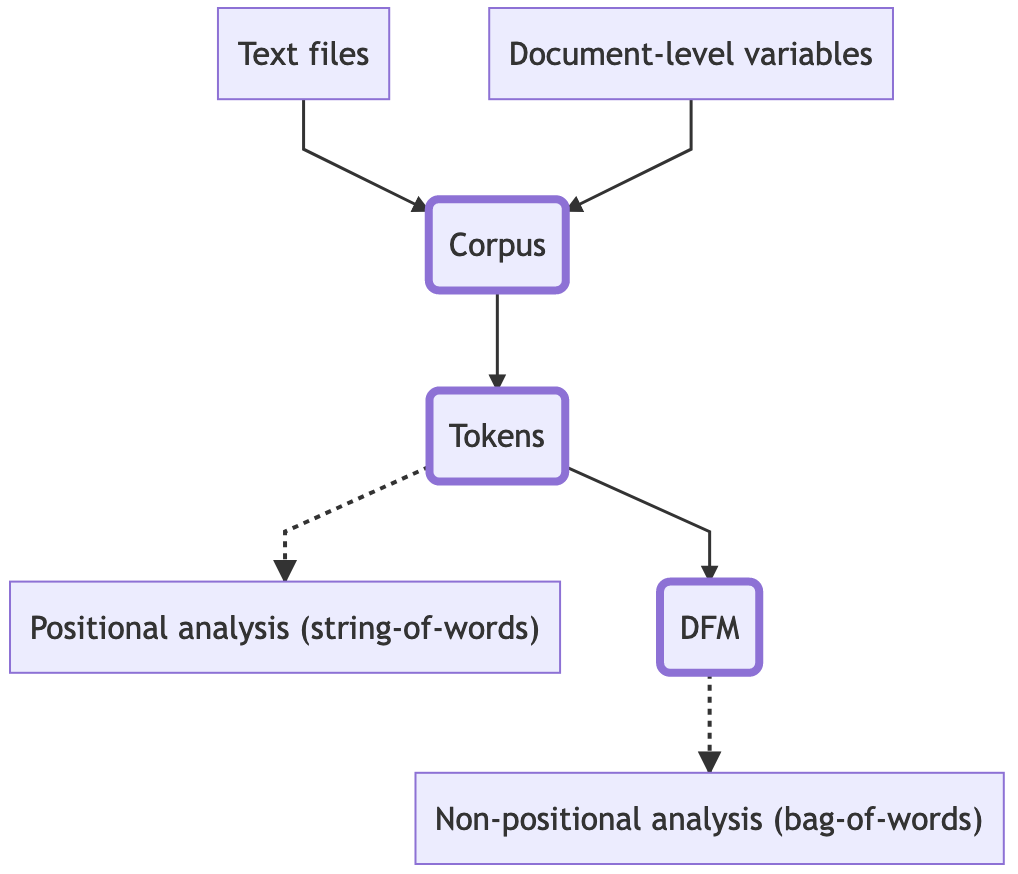
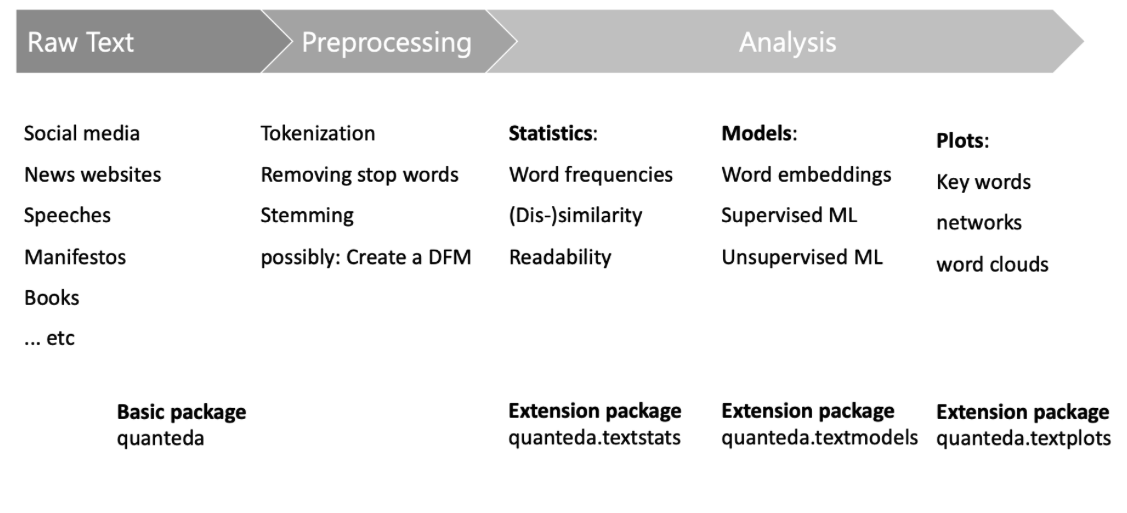
📖 1.-Corpus: the original data that will be pre-processed and analyzed.
🛠 2.-Tokens: Tokenization storing the words of our texts for further analysis.
📑 3.-Document Feature Matrix (DFM): helps us analyze and store the features of a text.
📚 Text files: Quanteda uses
readtextpackage. We can read .txt, .csv, .tab, .json. files.Even, we can read .pdf, .doc and .docx files.
Amazing, right? For our tutorial, we will use txt files.
🧙 Corpus
Important things:
📚 We can create a corpus from:
Character vectors
c()🖼 Dataframes that contain one column with a string or a text to be analyzed.
⛔ IMPORTANT ⛔: your string variable of your df must be name as text
SimpleCorpus from
tmpackage.
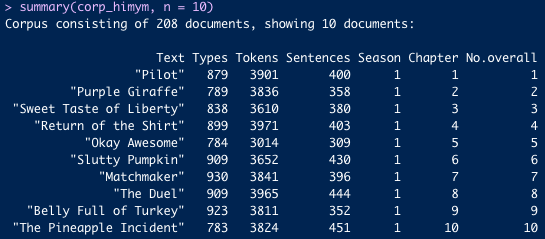
Here you can appreciate with our exercises what we can obtain.
1.-Text: Name of our document. In our case, the names are the episodes titles of HIMYM.
2.-Types: Different types of features that we can wrangle.
3.-Tokens: Number of tokens that our documents have.
4.-Sentences: Number of sentences per document. In our case, TV scripts.
5.-Chapter and No.overall are variables that we added. We will explain that later.
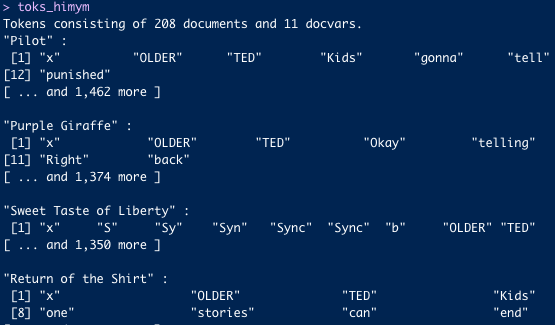
🪆 Tokens
Important things:
Tokens are just characters that segments texts into tokens (mainly words or sentences) by word boundaries.
📚 What a token object contains:
- Documents and docvars with the split of them into small units: words.
😎 Why tokenization is awesome?
You have functions like
remove_separatorsremove_numbersremove_symbols
Here you can appreciate with our exercises what we can obtain.
You can see the words that are separated.
📜 Document Feature Matrix

📜 Document Feature Matrix (DFM)
Important things:
DFM objects are super useful because we can do stats with them and analysis in general.
📜 What a DFM object contains:
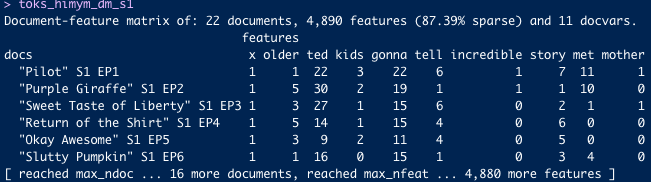
A matrix is a 2 dimensional array with m rows, and n columns.
In a dfm each row represents a document, and each column represents a feature.
Enables us to identify the most frequent features of a document.
Analyzes text based on the “bag of words” model.
Here you can appreciate with our exercises what we can obtain.
You can see the features.
⌛ Workflow
🍿 References and resources for this presentation

🍿 References and resources for this presentation
A Beginner’s Guide to Text Analysis with quanteda (University of Virginia)
Amazing document created by Kenneth Benoi (University of Münster)
An Introduction to Text as Data with quanteda (Penn State and Essex courses)
Text as Data: quantitative text analysis with R. Data Science Summer School 2022. Hertie School
All rights of each image to whom they correspond.

Let’s start, shall we?

Packages for the analysis
![]() Tidyverse: set of pacakges that will help us to wrangle our objetcs, dataframes, plots, etc. (Amazing tool)
Tidyverse: set of pacakges that will help us to wrangle our objetcs, dataframes, plots, etc. (Amazing tool)![]() Quanteda: set of pacakges that will help us to wrangle our objetcs, dataframes, plots, etc. (Amazing tool)
Quanteda: set of pacakges that will help us to wrangle our objetcs, dataframes, plots, etc. (Amazing tool)![]() Rvest: set of pacakges that will help us to wrangle our objetcs, dataframes, plots, etc. (Amazing tool)
Rvest: set of pacakges that will help us to wrangle our objetcs, dataframes, plots, etc. (Amazing tool)
 Tidyverse: set of pacakges that will help us to wrangle our objetcs, dataframes, plots, etc. (Amazing tool)
 Quanteda: set of pacakges that will help us to wrangle our objetcs, dataframes, plots, etc. (Amazing tool)
 Rvest: set of pacakges that will help us to wrangle our objetcs, dataframes, plots, etc. (Amazing tool)
![]() stringr: set of pacakges that will help us to wrangle our objetcs, dataframes, plots, etc. (Amazing tool)
stringr: set of pacakges that will help us to wrangle our objetcs, dataframes, plots, etc. (Amazing tool)![]() spacyr: set of pacakges that will help us to wrangle our objetcs, dataframes, plots, etc. (Amazing tool)
spacyr: set of pacakges that will help us to wrangle our objetcs, dataframes, plots, etc. (Amazing tool)
 stringr: set of pacakges that will help us to wrangle our objetcs, dataframes, plots, etc. (Amazing tool)
 spacyr: set of pacakges that will help us to wrangle our objetcs, dataframes, plots, etc. (Amazing tool)
Let’s start
Quanteda
Look our corpus, it’s divided into types, tokens and even sentences.
corp_himym <- corpus(df_himym_final_doc)  #Build a new corpus from the texts

docnames(corp_himym) <- df_himym_final_doc$Title

summary(corp_himym, n = 15)
Corpus consisting of 208 documents, showing 15 documents:
Text Types Tokens Sentences Season Chapter No.overall
"Pilot" 879 3901 400 1 1 1
"Purple Giraffe" 789 3836 358 1 2 2
"Sweet Taste of Liberty" 838 3610 380 1 3 3
"Return of the Shirt" 899 3971 403 1 4 4
"Okay Awesome" 784 3014 309 1 5 5
"Slutty Pumpkin" 909 3652 430 1 6 6
"Matchmaker" 930 3841 396 1 7 7
"The Duel" 909 3965 444 1 8 8
"Belly Full of Turkey" 923 3811 352 1 9 9
"The Pineapple Incident" 783 3824 451 1 10 10
"The Limo" 775 3821 365 1 11 11
"The Wedding" 875 4042 451 1 12 12
"Drumroll, Please" 812 3603 401 1 13 13
"Zip, Zip, Zip" 854 3496 386 1 14 14
"Game Night" 883 3383 350 1 15 15
Title Directed.by Written.by
"Pilot" Pamela Fryman Carter Bays & Craig Thomas
"Purple Giraffe" Pamela Fryman Carter Bays & Craig Thomas
"Sweet Taste of Liberty" Pamela Fryman Phil Lord & Chris Miller
"Return of the Shirt" Pamela Fryman Kourtney Kang
"Okay Awesome" Pamela Fryman Chris Harris
"Slutty Pumpkin" Pamela Fryman Brenda Hsueh
"Matchmaker" Pamela Fryman Chris Marcil & Sam Johnson
"The Duel" Pamela Fryman Gloria Calderon Kellett
"Belly Full of Turkey" Pamela Fryman Phil Lord & Chris Miller
"The Pineapple Incident" Pamela Fryman Carter Bays & Craig Thomas
"The Limo" Pamela Fryman Sam Johnson & Chris Marcil
"The Wedding" Pamela Fryman Kourtney Kang
"Drumroll, Please" Pamela Fryman Gloria Calderon Kellett
"Zip, Zip, Zip" Pamela Fryman Brenda Hsueh
"Game Night" Pamela Fryman Chris Harris
Original.air.date Prod.code US.viewers.millions. year Season_w
September 19, 2005 (2005-09-19) 1ALH79 10.94 2005 Season 1
September 26, 2005 (2005-09-26) 1ALH01 10.40 2005 Season 1
October 3, 2005 (2005-10-03) 1ALH02 10.44 2005 Season 1
October 10, 2005 (2005-10-10) 1ALH03 9.84 2005 Season 1
October 17, 2005 (2005-10-17) 1ALH04 10.14 2005 Season 1
October 24, 2005 (2005-10-24) 1ALH05 10.89 2005 Season 1
November 7, 2005 (2005-11-07) 1ALH07 10.55 2005 Season 1
November 14, 2005 (2005-11-14) 1ALH06 10.35 2005 Season 1
November 21, 2005 (2005-11-21) 1ALH09 10.29 2005 Season 1
November 28, 2005 (2005-11-28) 1ALH08 12.27 2005 Season 1
December 19, 2005 (2005-12-19) 1ALH10 10.36 2005 Season 1
January 9, 2006 (2006-01-09) 1ALH11 11.49 2006 Season 1
January 23, 2006 (2006-01-23) 1ALH12 10.82 2006 Season 1
February 6, 2006 (2006-02-06) 1ALH13 10.94 2006 Season 1
February 27, 2006 (2006-02-27) 1ALH14 9.82 2006 Season 1
Title_season
"Pilot" S1 EP1
"Purple Giraffe" S1 EP2
"Sweet Taste of Liberty" S1 EP3
"Return of the Shirt" S1 EP4
"Okay Awesome" S1 EP5
"Slutty Pumpkin" S1 EP6
"Matchmaker" S1 EP7
"The Duel" S1 EP8
"Belly Full of Turkey" S1 EP9
"The Pineapple Incident" S1 EP10
"The Limo" S1 EP11
"The Wedding" S1 EP12
"Drumroll, Please" S1 EP13
"Zip, Zip, Zip" S1 EP14
"Game Night" S1 EP15- 🥽 Second step: Convert corpus into tokens and wrangle it. Look our tokenization, we separate our text into words. Amazing!
corp_himym_stat <- corp_himym

docnames(corp_himym_stat) <- df_himym_final_doc$Title_season


corp_himym_s1_simil <- corpus_subset(corp_himym_stat, Season == 1) #We want to analyze just the first season


toks_himym_s1 <- tokens(corp_himym_s1_simil, #corpus from all the episodes from the first season
                        remove_punct = TRUE, #Remove punctuation of our texts
                        remove_separators = TRUE, #Remove separators of our texts
                        remove_numbers = TRUE, #Remove numbers of our texts
                        remove_symbols = TRUE) %>% #Remove symbols of our texts
  tokens_remove(stopwords("english")) #Remove stop words of our texts

toks_himym_s1